
Using the AI Assistant
The AI Assistant is a powerful, built-in tool that helps you create, improve, and optimize text across your entire project – directly where you write.
It’s fully integrated into the platform and powered by ChatGPT, allowing you to generate high-quality copy for websites, funnels, stores, blogs, and emails in just a few clicks.
Instead of switching between tools, copying text back and forth, or starting from a blank page, you can use AI exactly where it’s needed - to improve clarity, expand ideas, adjust tone, or generate entirely new content.
The AI Assistant is designed to:
- Save time
- Improve quality and consistency
- Support creativity and experimentation
- Help you write conversion-focused, SEO-optimized content
💡 Tip
The AI Assistant is included in all Recrevio projects and is available to you at no extra cost. You don’t need a separate ChatGPT or OpenAI account – everything is built directly into the platform.
Because it’s fully integrated, you can use it wherever writing is needed – quickly, safely, and without leaving your workflow.
The AI Assistant is designed to support your work, not replace your voice. You’re always in full control and can edit, adjust, or ignore suggestions as you like.
What You Can Use the AI Assistant For
The AI Assistant can be used anywhere you work with text in the platform.
Where You Can Use It
You can access the AI assistant in:
- Website pages
- Funnels and funnel steps
- Blog posts and blog summaries
- Product titles and descriptions
- Email campaigns and newsletters
- Page SEO fields (title and meta description)
- Any editable text area across your project
Whenever you highlight text or place your cursor in a text field, the AI icon becomes available in the text edit controls.
What You Can Do With It
The AI Assistant helps you both create new content and improve existing content.
Core Capabilities
You can use the AI to:
✨ Improve existing copy (clarity, flow, professionalism)
➕ Expand short text into detailed content
➖ Shorten long text into concise summaries
✍️ Generate new text from a prompt
🎭 Adjust tone and emotion (friendly, professional, playful, assertive, etc.)
Practical Use Cases
The AI assistant is ideal for:
- Writing landing page copy and sales pages
- Creating compelling headlines and CTAs
- Generating blog posts in specific voices or styles
- Producing SEO-optimized summaries and metadata
- Writing product descriptions for your store
- Improving email copy and subject lines
- Iterating on copy during A/B testing
- Quickly drafting content to refine later
Why This Matters
Good copy directly affects:
- Conversions
- Engagement
- SEO performance
- Brand consistency
The AI Assistant helps you move faster without sacrificing quality—and gives you the freedom to test, refine, and iterate without friction.
It’s not meant to replace your strategy or voice—but to support and accelerate your workflow.
How to Use the AI Assistant
Let's start with the basics then get in to how to use it across your entire project.
When you navigate to any text area and highlight it on your website/funnel/store and also email marketing you will see a neat AI icon located to the right of the edit bar 'as shown below'
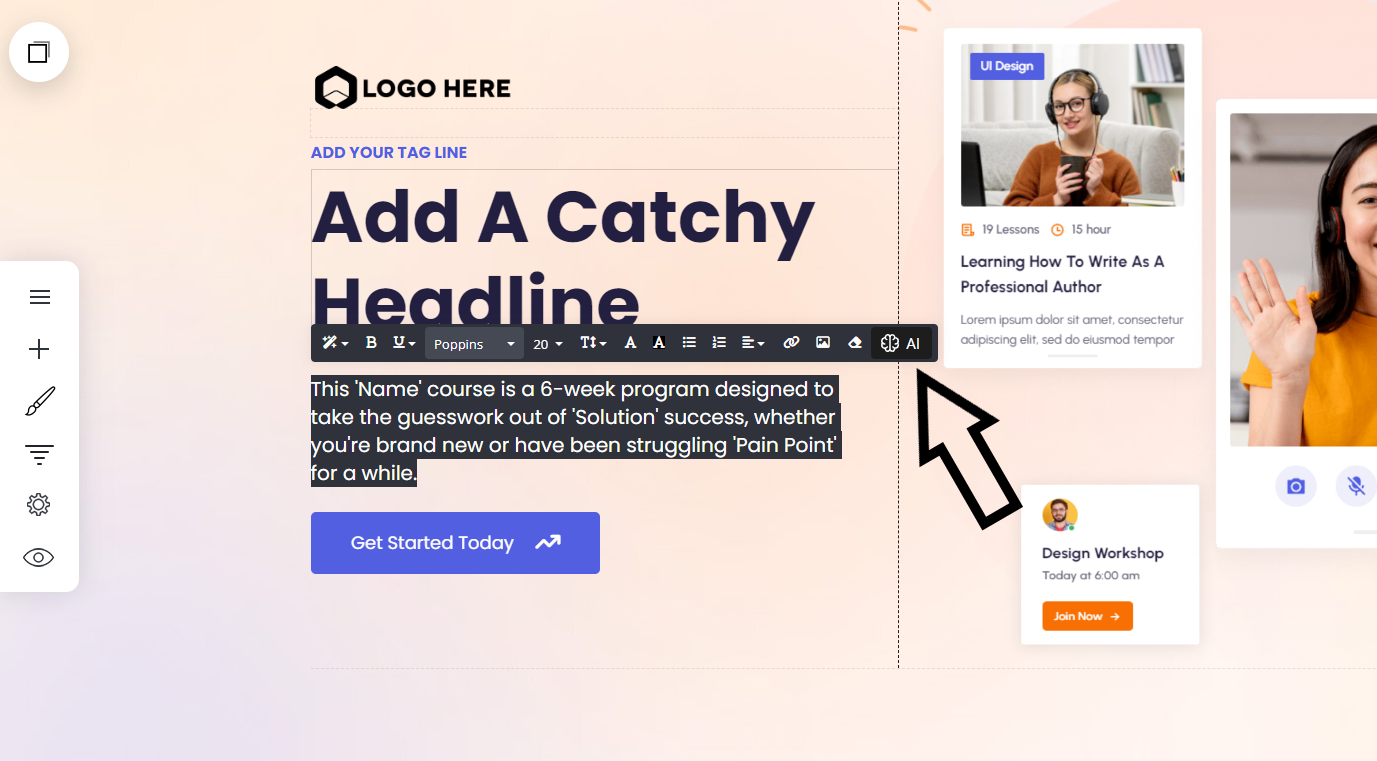
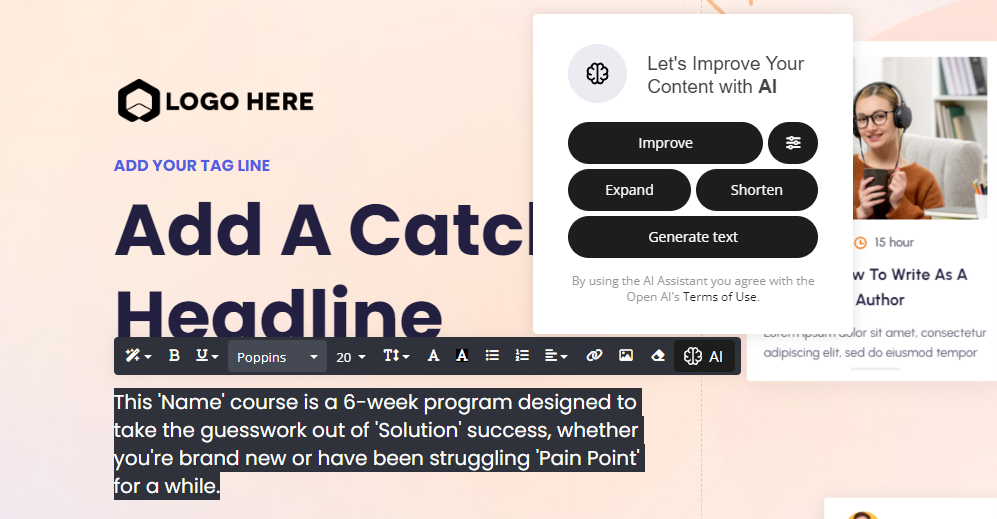
Once you select the AI Icon a new window will display where the AI assistant takes over.
Within the display window, you will see 5 buttons:
- Improve
- Expand
- Shorten
- Generate text
- Temperate 'denoted by a line icon top right'
💡 Input text
We will go through this next section using this text copy. So you can see the differences the AI makes:
"The funnel lead generation course is a 6-week program designed to take the guesswork out of doing it yourself, whether you're brand new or have been struggling to get more leads for a while, this is for you."
Improve
The improve button will improve on the originating text you already have. You can keep clicking to get a new result every time until you find an output you like.
✨ Result:
"The six-week course is designed to assist beginners or those who struggle with lead generation. Its main aim is to eliminate any doubts and offer customized support to help you achieve your objectives."
Expand
Expanding text will expand/elaborate on the original text input. Generally this will make your text longer.
✨ Result:
"The funnel lead generation course is a comprehensive 6-week program that is expertly designed to help you master the art of lead generation. Regardless of whether you are a complete beginner or someone who has been struggling for a while to generate leads, this course is tailored to meet your needs. The course has been specifically created to eliminate the guesswork and help you achieve success in lead generation. Over the 6 weeks, you will learn proven strategies and techniques that have been used by industry leaders to boost their sales and grow their businesses. You will gain access to powerful tools and resources that will help you build effective sales funnels and optimize your lead generation efforts. The course is structured in a way that enables you to learn at your own pace, with weekly modules that are easy to follow and include practical exercises and assignments to ensure that you can apply what you learn to your own business. By the end of the course, you will have acquired the skills and knowledge needed to generate high-quality leads and drive sustainable growth for your business."
Shorten
The shorten button will shorten the originating text input. Or create a more to the point result.
✨ Result:
"No more guess work. The 6-week funnel lead generation course is designed for beginners or those struggling to get more leads."
Temperature
The temperature button enables you to add emotion to your text, providing you with the right tone your want to display to your visitors.
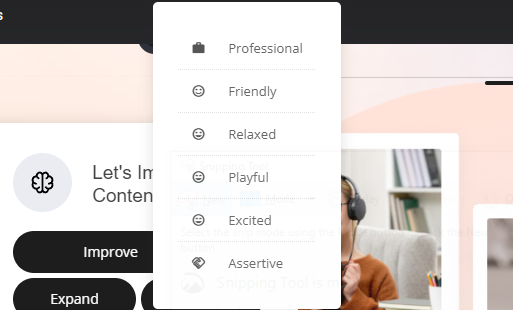
Using the same test text as before, let's test the temperature setting.
✨ Professional
"The 6-week funnel lead generation course is expertly crafted to eliminate any uncertainties associated with self-implementation. Irrespective of whether you are a nascent entrepreneur or have been grappling with low lead generation rates, this program is tailored to cater to your specific needs."
✨ Friendly
"Hey there! Are you tired of feeling uncertain about how to achieve success with 'Solution'? Look no further than our 'Name' course! Our 6-week program is designed with you in mind, whether you're a newbie or have been facing the 'Pain Point' challenge for some time. Let us guide you to success in a fun and stress-free way!"
✨ Relaxed
"This course, called "Name," goes on for 6 weeks and is meant to help you achieve success in "Solution" without any confusion, regardless of whether you are new to it or have been grappling with "Pain Point" for a while."
✨ Playful
"Looking to level up your 'Solution' game and banish those 'Pain Point' woes? Look no further than our 'Name' course! Our 6-week program is here to kick confusion to the curb and transform you into a total 'Solution' superstar, whether you're a newbie or a seasoned struggler. Let's do this!"
✨ Excited
"Are you tired of guessing how to succeed in finding a solution to your 'Pain Point'? Look no further! Our 'Name' course is a thrilling 6-week program that guarantees to take the guesswork out of your 'Solution' success. Whether you're a rookie or have been struggling for some time, this course is the ultimate solution you've been searching for!"
✨ Assertive
"The 'Name' course guarantees to eliminate any uncertainties surrounding 'Solution' achievement, regardless of whether you're a novice or have been grappling with 'Pain Point' for an extended period. It is a fool proof 6-week program."
As you can see, it gives you some amazing results. Note: you can mix and match any of the options to give you the best possible outcome you are looking for. For example you could use the Improve then select playful to give you different responses.
Generate Text
The last option is having the ability to add your own text and the AI assistant will harness the power of ChatGPT and create a response for you. Again after you generate the text, you can use any of the further options to fine tune to final text out put.
The idea here is to be creative, prompt it with what you want, give it some context maybe an outcome or even ask for a summary and the AI will do it's work!
First select the generate text button
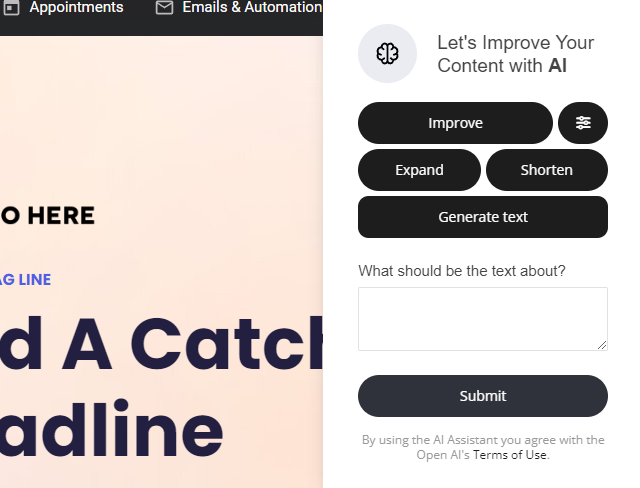
💡 Input text:
"I am selling an online course to marketing beginners, the course is 6 weeks long and they will learn how to create funnels, optimize them and how to generate as much traffic as possible. Can you create a compelling headline, short description and include 2 main benefits upon joining and if they start today they get it at half price."
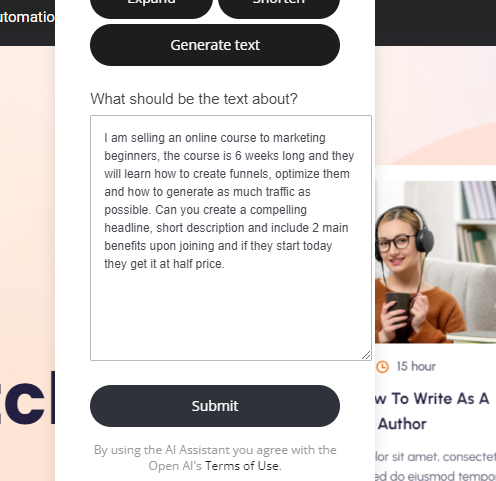
✨ AI Response
Are you new to marketing and struggling to get your online presence off the ground? Look no further than our 6-week online course designed specifically for beginners. Learn how to create effective marketing funnels, optimize them for maximum conversions, and generate massive amounts of traffic to your website. By joining today, you'll also receive two key benefits:
Access to an exclusive community of fellow marketers and personalized coaching from industry experts. And the best part? Sign up now and get the entire course at half the price. Don't wait to start your journey towards marketing success – enroll today.
Using the AI Assistant for optimizing Search Engine Optimization (SEO)
Our AI Assistant will also generate your page SEO for you! You can either use the AI as shown above or, let the power of AI to create it from scratch for you. The AI will read your entire website/funnel or single page and optimize the entire SEO for you.
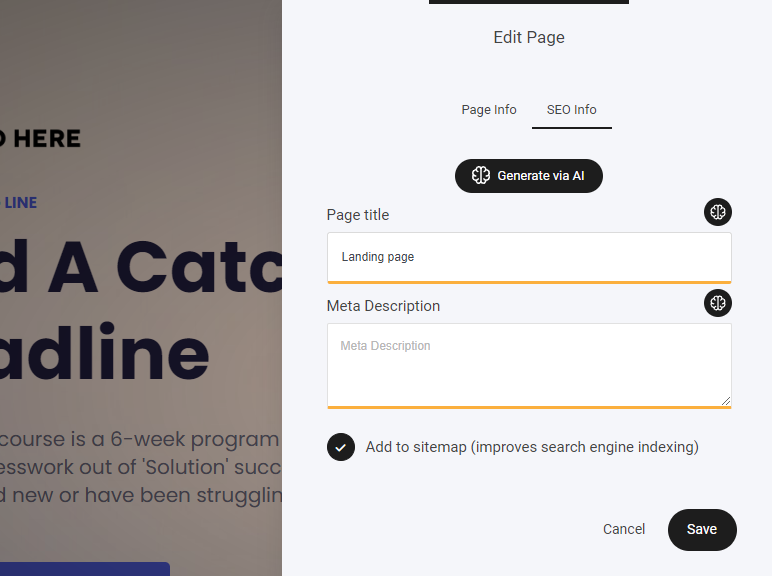
When navigating to the page SEO settings you will see this display where you can add your SEO information. Title and Meta description. The difference here is the actual button. You now have two. The little AI icon opens the standard AI assistant buttons as shown earlier for general text editing. The other is the Generate via AI. Selecting this button AI will read your page and use AI to create the best SEO possible for you. Let's go ahead and test it out by pressing the Generate via AI button:
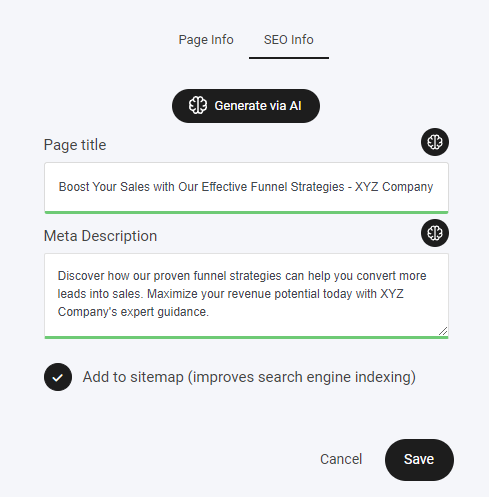
Again you can go ahead and fine tune it with the other options if required via the small AI icon.
Using the AI Assistant to optimize Product Tiles and Descriptions
Just like the rest of the amazing AI, you can use our AI assistant within your store products to help you create compelling titles and descriptions.
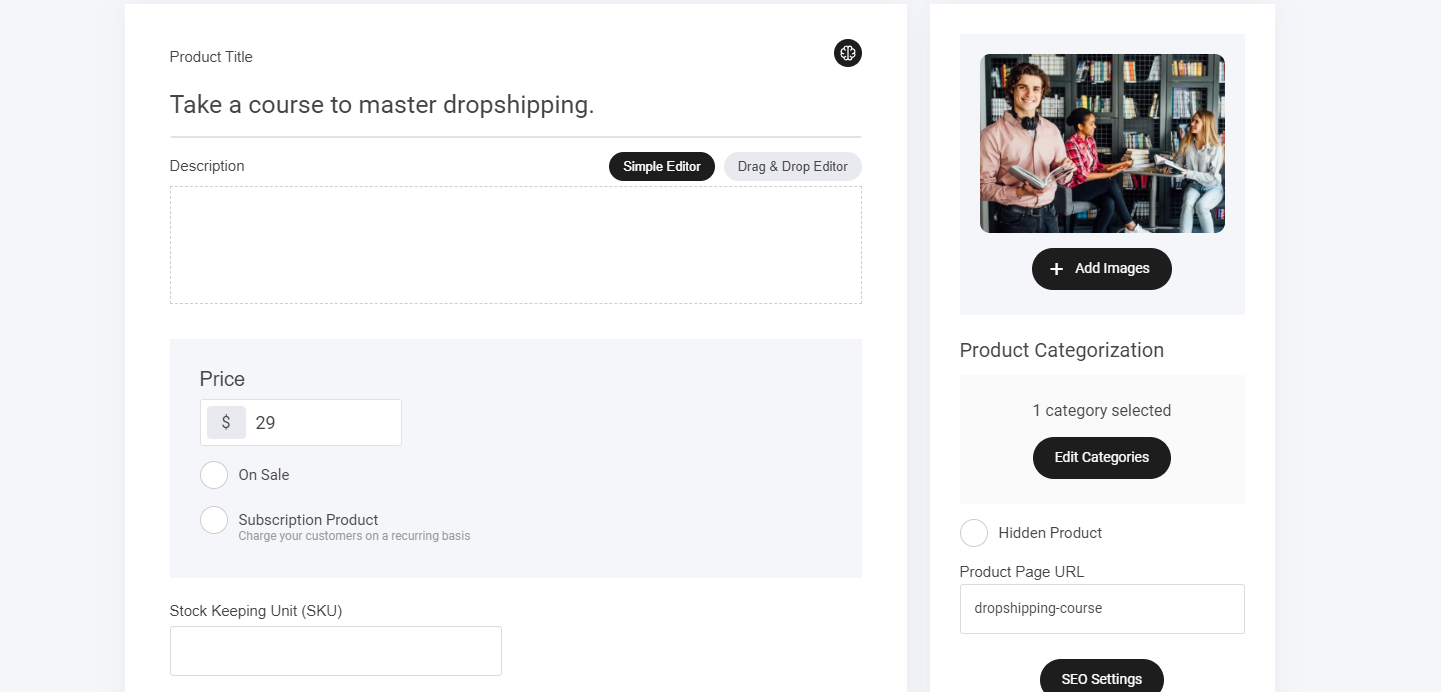
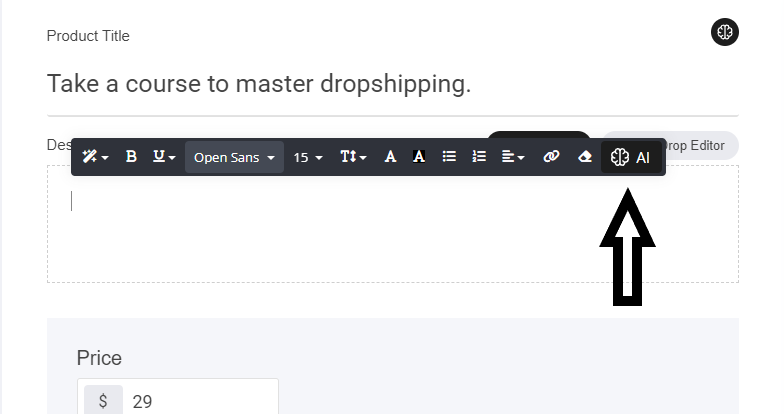
To start using the AI assistant navigate to the AI Icon in and around the text areas. We already have a title, so let's allow the AI to generate a product description for us. Click on the empty box and select the AI icon:
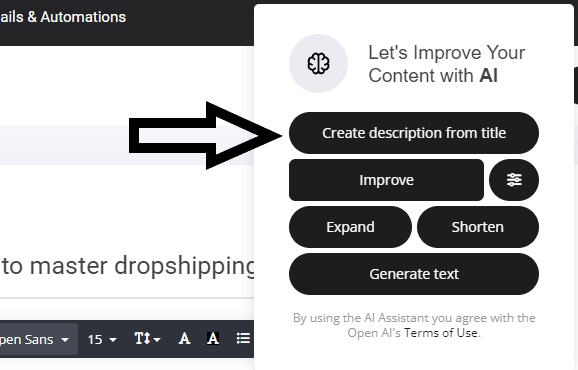
Once selected a new window will display, the same as the normal AI generator, but this time you will see a new button 'Create description from title' Now let's test it.
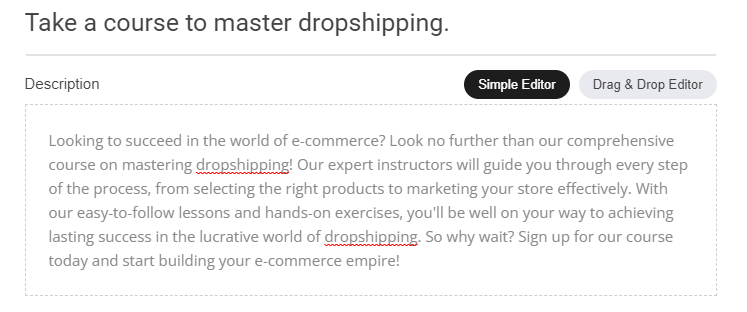
And once again the AI generates a great product description for us! If you need to fine tune it, then simply use any of the other buttons as mentioned earlier to improve, expand or even change the temperature and tone of the response.
Using the AI Assistant to write email copy
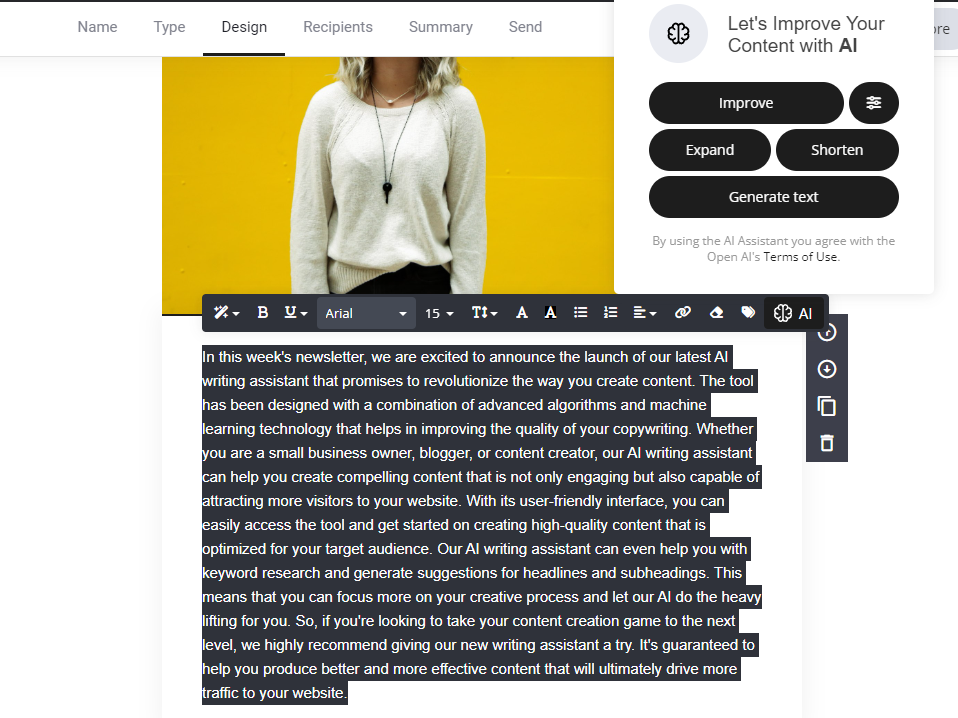
The same process applies when using the AI assistant within the email editor. You use it to help generate titles to complete email bios. So let's test it out below.
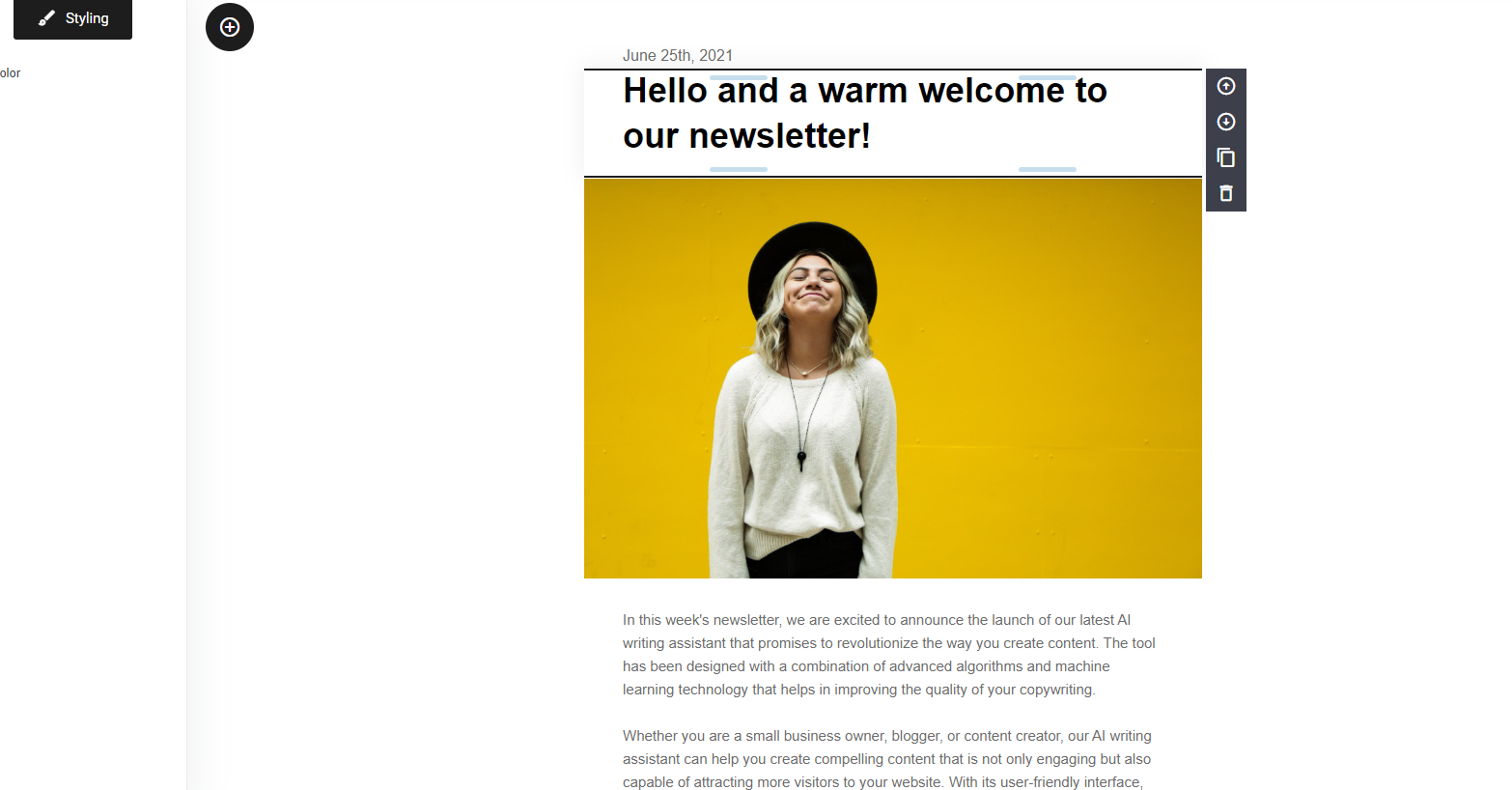
For this test, we used the Tone setting set to Friendly for the headline and applied the Expand feature to develop the main bio text.
💡 Original copy (input)
In this week’s newsletter you will discover how to use our new AI Assistant to help improve your copy and attract more people to visit your website.

Using the AI assistant, this short description was expanded into a more detailed and engaging version:
✨ AI-generated expanded copy (output)
In this week's newsletter, we are excited to announce the launch of our latest AI assistant that promises to revolutionize the way you create content. The tool has been designed with a combination of advanced algorithms and machine learning technology that helps in improving the quality of your copywriting.
Whether you are a small business owner, blogger, or content creator, our AI assistant can help you create compelling content that is not only engaging but also capable of attracting more visitors to your website. With its user-friendly interface, you can easily access the tool and get started on creating high-quality content that is optimized for your target audience.
Our AI assistant can even help you with keyword research and generate suggestions for headlines and subheadings. This means that you can focus more on your creative process and let our AI do the heavy lifting for you.
So, if you're looking to take your content creation game to the next level, we highly recommend giving our new writing assistant a try. It's guaranteed to help you produce better and more effective content that will ultimately drive more traffic to your website.
Once the AI has generated your bio copy, you can go ahead and use the other AI tools to fine tune if required.
Using the AI Assistant to Create Engaging Blog Posts
The AI Assistant makes it easy to generate creative, engaging blog content in a specific tone or voice.
💡 Example input using the Generate Text button
Write me a blog post that highlights the benefits of using AI generative copy to create blogs, in the voice of Bart Simpson.

Based on this prompt, the AI generates a complete blog post written in a playful, humorous tone inspired by Bart Simpson – demonstrating how flexible and creative the assistant can be when shaping voice and style.

Once you have your blog post written out, you may be wondering how to create a completing summary for your SEO, well the AI assistant will generate it for you, see next section.
Using the AI Assistant to Create a SEO-Optimized Blog Summary
Once your blog post is complete, you may want to add a strong summary for SEO purposes. The AI Assistant helps with this as well.

To generate a summary:
- Navigate to the Summary field
- Select Create from post content
The AI assistant will automatically generate a concise, SEO-optimized summary based on the full blog post – saving time while ensuring relevance and clarity.
The same rules apply here if you want to refine AI-generated content. You can continue using prompt helpers to:
- Adjust the tone
- Expand or shorten sections
- Improve clarity or structure
The AI assistant is designed to support iteration, not just one-time generation.
Usage and limitations
You can use the AI Assistant without limitations across all your projects and create an unlimited number of prompts.
The only usage constraint applies to response length:
- Each AI-generated response is limited to 500 words
- You can generate an unlimited number of responses
For example, if you request a 3 000-word blog post, the AI will generate the first 500 words. You can then continue by prompting the AI again to expand or continue the content.
By using the AI Assistant, you agree to Terms of Use.