
SEO & AI Audit – Optimize Your Pages for Search and AI
The SEO & AI Audit analyzes the page you're currently working on and gives you a clear overview of how well it is prepared for both traditional search engines and AI-powered answer engines.
Instead of checking SEO settings, headings, links, images, content structure, and AI-readiness manually, the audit brings everything together in one place and shows:
- What's already working
- What could be improved
- Critical issues that should be addressed
- Direct links to settings or widgets where an issue can be fixed
The result is a practical, page-by-page checklist that helps you improve your content without needing to be an SEO expert.
⚡ Why it matters
People increasingly discover businesses and information through a mix of traditional search results and AI-generated answers.
A well-structured page makes it easier for both search engines and AI systems to understand:
- What the page is about
- Which information is most important
- How the content is structured
- How pages on your site relate to each other
- What your business, products, or services represent
The SEO & AI Audit helps you spot weaknesses before they become missed opportunities.
How the SEO & AI Audit works
The audit analyzes the individual page you're currently viewing.
It checks a combination of traditional on-page SEO signals, accessibility, content structure, linking, and signals that can make content easier for AI systems to interpret and reference.
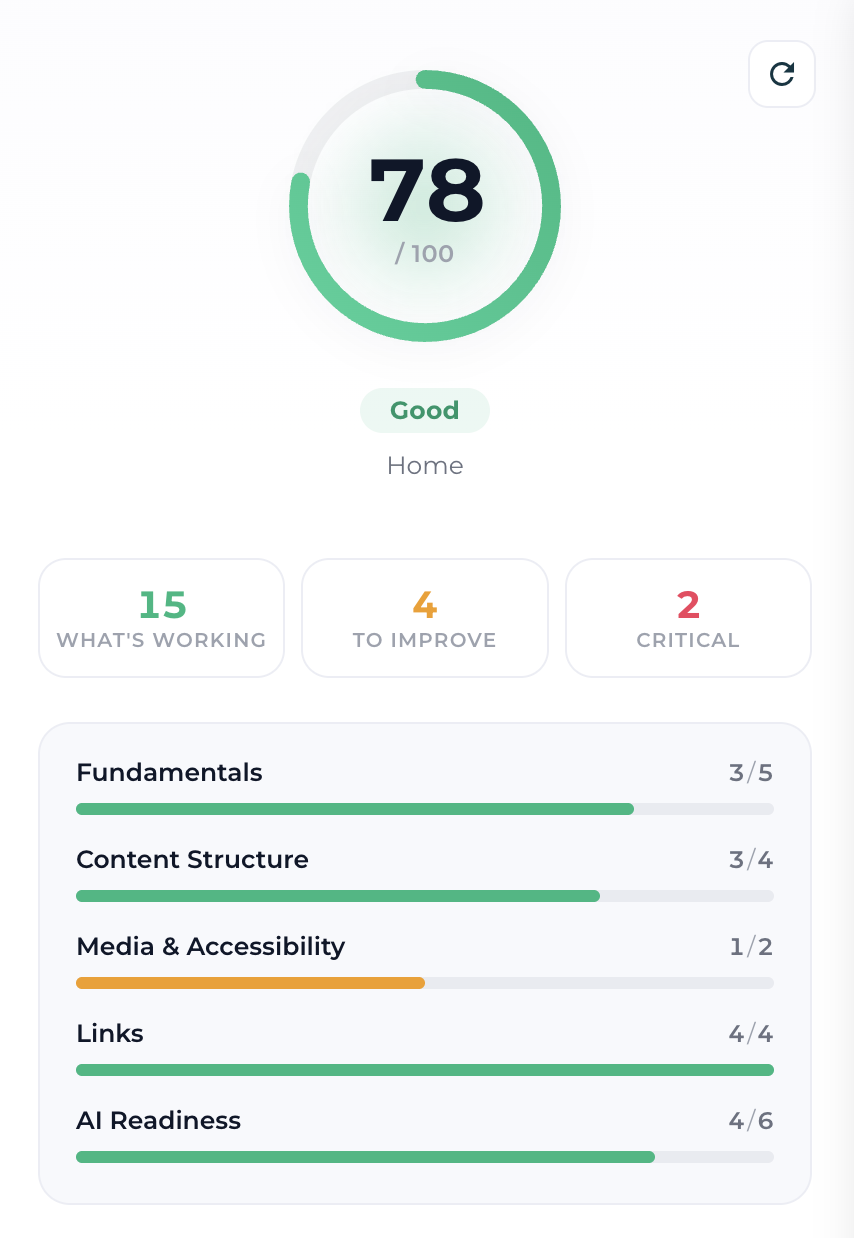
After the analysis, you'll see:
- An overall score from 0–100
- A general status such as "Needs work" or "Good"
- The number of checks that are working
- The number of recommendations to improve
- The number of critical issues
- A breakdown by category
- Individual recommendations and explanations
After making changes, use the refresh icon at the top of the panel to run the audit again and see your updated results.
💡 Tip
The audit is page-specific. Improving one page does not automatically improve the scores of your other pages.
Which pages should you audit?
We recommend running the audit on the important pages you want people to discover through search engines or AI.
Typical examples include:
- Homepage
- Service pages
- Product or offer pages
- Landing pages intended to rank organically
- About pages
- Important informational pages
- Blog posts and other public content
You don't necessarily need to optimize every page for search.
Pages such as thank-you pages, private content, internal utility pages, or pages intentionally hidden from search engines may have a very different purpose.
💡 Tip
Start with your most commercially or strategically important public pages, fix the biggest issues, and then work through the rest of the site.
Understanding your score
The score gives you a quick estimate of how well the current page performs across the audit's on-page checks.
The results are divided into three groups:
What's Working
These checks have passed.
They show what is already correctly configured, so you know what not to spend time fixing.
To Improve
These are opportunities that could make the page stronger.
They are not necessarily serious errors, but improving them can make the page clearer, more useful, or easier for search engines and AI systems to understand.
Critical
Critical issues indicate more fundamental problems that are worth prioritizing.
For example, an important public page without a meta description or main H1 heading may be flagged as critical.
💡 Tip
Don't treat the score as a goal in itself. A useful, relevant page scoring 90 can be better than a page artificially modified to reach 100.
Use the recommendations as guidance – not as a reason to add unnecessary content.
Audit categories
The checks are grouped into five areas so you can quickly see where a page is strong and where it needs work.
Fundamentals
Covers the core information search engines need to identify and understand the page.
This includes checks such as:
Page title
Checks whether the page has an appropriate SEO title and whether its length is reasonable.
The audit may recommend approximately 30–65 characters when a title is particularly short or long.
Meta description
Checks whether a meta description has been added.
The description can help search engines and other systems understand what the page contains and may be used when the page is presented in search results or other contexts.
URL slug
Checks the page's URL structure.
Short, descriptive URLs generally make both the page and its subject easier to understand.
Visibility to search engines
Checks whether the page is public and available for indexing.
This is especially important for pages you actually want people to discover through search.
Social share image
Checks whether a share image has been configured.
This controls how the page can appear when shared on social platforms and other services that use its social metadata.
Content Structure
This category looks at how clearly the page itself is organized.
Main heading (H1)
Important pages should normally have one clear H1 heading describing the main topic of the page.
The H1 gives visitors, search engines, and AI systems an immediate indication of what the page is about.
Heading hierarchy
Checks whether heading levels are used in a logical order.
For example:
H1 → H2 → H3
rather than jumping randomly between heading levels based purely on their visual size.
Your heading levels should represent the structure of the content, while their appearance should be controlled through Global Styling.
Content depth
Very thin pages may not contain enough information to properly explain their topic.
The audit can flag pages with limited content and may suggest aiming for 300+ words where appropriate.
⚠️ Important
More content is not automatically better.
A short contact page doesn't need 300 words just to satisfy an audit. Use this recommendation when additional content would genuinely make the page more useful or complete.
Media & Accessibility
Images can communicate useful information to both visitors and automated systems, but only when they're properly described.
Image alt text
Checks whether images are missing alternative text.
Good alt text improves:
- Accessibility
- Image search
- Understanding of image content by automated systems
When available, Show widget takes you directly to the relevant image so you can fix it.
Alt text quality
The audit also evaluates whether existing alt text appears descriptive rather than simply checking whether the field contains something.
Good alt text should briefly explain what is relevant about the image.
💡 Tip
Describe the image naturally. Don't fill alt text with keywords that don't help someone understand what the image represents.
Links
Internal links help both visitors and automated systems understand the relationship between different pages on your site.
The audit checks your linking structure, including areas such as:
Internal links
Checks whether the page links to other relevant pages within your website.
Internal links can help visitors continue exploring and make important related content easier to discover.
Broken internal links
Checks whether internal links point to pages that actually exist.
Broken links create a poor visitor experience and prevent crawlers from following the intended path.
Descriptive link text
Checks whether links use meaningful wording.
For example:
Learn more about our coaching program
is more descriptive than:
Click here
Descriptive link text gives both visitors and automated systems more context about the destination.
The panel can also evaluate additional link-related signals depending on the content available on the page.
AI Readiness
The AI Readiness section looks for content structures and signals that can make a page easier for AI-powered search and answer systems to interpret.
These checks complement traditional SEO rather than replacing it.
Structured data (JSON-LD)
Checks whether structured data is present on the page.
Structured data gives machines explicit information about what something represents – for example an organization, product, article, event, or FAQ.
If structured data is missing, the audit can provide a Generate JSON-LD action to help you create suitable markup.
The generated code can then be added to the page head.
FAQ / Q&A content
Checks whether the page contains FAQ or question-and-answer content.
Well-written Q&A sections can make direct answers easier to identify and are particularly useful when visitors commonly search for specific questions about the topic.
⚠️ Important
Don't add an FAQ simply to pass the audit.
Use one when real customers or visitors have meaningful questions that are worth answering.
Question-style headings
Checks whether headings reflect questions people may actually ask.
For example:
How does the free trial work?
can sometimes communicate intent more clearly than:
Free Trial
This structure can be helpful for search, voice search, and AI-generated answers.
Not every heading needs to be a question. Use question headings where they make the content easier to navigate naturally.
Answer-first intro
Checks whether the page starts by clearly explaining its subject.
An effective opening paragraph should help someone quickly understand the answer or topic before going into more detail.
For example, instead of beginning with several paragraphs of background, start with the key information and expand from there.
This is useful for human visitors as well as systems trying to extract concise answers from your content.
Trust & entity signals
Looks for information that helps establish the people, organization, or business behind the content.
This can include signals such as:
- Social profiles
- Business or location information
- Other identifiable organization details
These signals can help establish clearer context around who the page represents.
Actionable recommendations
One of the most useful parts of the SEO & AI Audit is that many recommendations don't just tell you what's wrong – they help you get to the place where you can fix it.
Depending on the recommendation, you may see actions such as:
Open SEO settings
Takes you directly to the page's SEO settings for items such as:
- Page title
- Meta description
- Social share image
Show widget
Takes you to the relevant widget when the issue exists inside page content – for example an image missing alt text.
Generate JSON-LD
Helps you create structured data that can be added to the page.
Other recommendations, such as adding an H1, improving content depth, or creating an FAQ, require editing the page content itself.
💡 Tip
Work through Critical items first, then the recommendations under To Improve. This usually gives you the biggest improvements fastest.
Re-run the audit after making changes
The audit represents the current version of the page at the time it was analyzed.
After you've made changes:
- Save your page changes
- Return to the SEO & AI Audit
- Click the refresh icon
- Review the updated score and recommendations
- Continue until the important issues for that page have been addressed
You can also open What's Working to verify which checks are now passing.
SEO & AI Audit vs llms.txt
These features solve different problems and work well together.
SEO & AI Audit analyzes individual pages and helps improve their content, structure, metadata, accessibility, linking, and AI-readiness.
llms.txt provides a structured site-level overview that compatible AI tools can use to better understand the website and its important content.
Neither replaces the other – and neither replaces good content or traditional SEO fundamentals.
What the audit does not measure
The SEO & AI Audit is an on-page estimate.
It focuses on signals Recrevio can analyze directly from the current page.
It does not measure important off-page or external factors such as:
- Backlinks
- Domain authority
- Competitor strength
- Search demand
- Actual search rankings
- Website traffic
- All aspects of website performance
A high audit score therefore doesn't guarantee that a page will rank highly in Google or appear in AI-generated answers.
Likewise, a lower score doesn't necessarily mean the content cannot perform well.
The audit is designed to help you build a stronger on-page foundation.
Don't optimize blindly
The recommendations are designed to identify useful opportunities, but context still matters.
For example:
- A simple contact page may not need 300+ words
- Every page does not need an FAQ
- Every heading should not be written as a question
- Some pages should intentionally be hidden from search engines
- Structured data should accurately describe the content that really exists on the page
💡 Tip
Ask yourself whether a change makes the page clearer or more useful for the visitor. If the answer is yes, it's usually a worthwhile optimization.
Recommended workflow
For pages you want indexed and discovered:
- Run the SEO & AI Audit
- Fix any Critical issues
- Review Fundamentals and make sure the page is indexable and has clear metadata
- Check your H1 and heading hierarchy
- Improve thin or unclear content where genuinely useful
- Add descriptive alt text to meaningful images
- Review internal links and link text
- Consider relevant AI-readiness improvements such as structured data, FAQs, or clearer answer-first content
- Re-run the audit
- Move on to the next important public page
Repeat the process for the pages that matter most to your organic visibility.
Best Practices
- Audit every important page you want indexed
- Prioritize Critical issues before smaller improvements
- Use clear, descriptive page titles and meta descriptions
- Give each important page a clear main H1
- Use headings according to content hierarchy rather than appearance
- Write for visitors first and search systems second
- Add useful internal links between related pages
- Use descriptive link text
- Add meaningful alt text to informative images
- Include structured data when it accurately represents the page
- Use FAQs and question headings only when they naturally improve the content
- Make the purpose of the page clear near the beginning
- Re-run the audit after significant changes
- Don't chase a perfect score by adding irrelevant content
Troubleshooting
I fixed something but the audit still shows the warning
Save your page changes and click the refresh icon to run a new analysis.
My page is intentionally not indexed but Visibility to search engines is flagged
That's expected. The audit identifies the condition, but not every recommendation applies to every page. If the page should remain private or excluded from search, leave the setting as intended.
The audit recommends more content, but my page doesn't need it
Don't add filler just to increase the score. The recommendation is most relevant to pages that need enough content to explain or compete around a meaningful topic.
I have images but the audit says alt text is missing
Use Show widget where available to locate the image, then add a useful image description.
I don't have structured data
Use Generate JSON-LD to create a starting point, then make sure the generated markup accurately represents the page before adding it.
My score isn't 100
That's completely fine. The audit is a diagnostic tool rather than a requirement. Focus on issues that genuinely improve the page and support its purpose.
Summary
- SEO & AI Audit analyzes the individual page you're currently working on
- It evaluates traditional SEO together with content, accessibility, linking, and AI-readiness signals
- Results are divided into What's Working, To Improve, and Critical
- The audit covers Fundamentals, Content Structure, Media & Accessibility, Links, and AI Readiness
- Many recommendations include direct actions that take you to the relevant setting or widget
- Use the refresh button to re-run the analysis after making changes
- Run the audit on the important public pages you want search engines and AI systems to discover
- The score is an on-page estimate – not a guarantee of rankings, traffic, or AI citations
- Use recommendations as guidance and prioritize useful content over chasing a perfect score
Used as a page-by-page workflow, the SEO & AI Audit gives you a practical way to improve the foundations of your site's visibility – without having to manually check dozens of SEO and AI-readiness details yourself.