
Reviews Widget
The Reviews Widget allows you to collect structured, trustworthy feedback directly on your pages, funnels, discussions, and more. It combines a 5-star rating system with written reviews, replies, moderation controls, and styling options—making it ideal for testimonials, program feedback, product reviews, and community-driven validation.
Unlike simple comments, Reviews are designed to highlight quality feedback, encourage thoughtful responses, and build social proof in a controlled and professional way.
With the Reviews Widget, you can:
- Collect star ratings and written reviews
- Moderate and approve reviews before publishing
- Enable threaded replies to reviews
- Allow image uploads for richer feedback
- Control display order, visibility, and layout
- Match reviews visually to your brand (light & dark themes)
The widget can be placed anywhere widgets are supported and always respects your platform’s access rules and moderation settings.
Adding the Reviews Widget
To add a Reviews Widget:
- Open the page, funnel step, or discussion where you want to collect reviews
- Click the ➕ (plus) button to open the widget panel
-
Locate the Reviews Widget
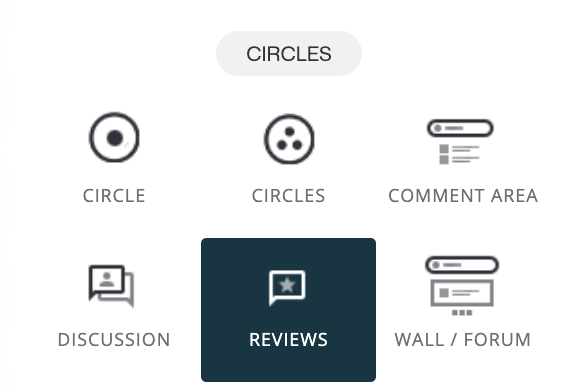
- Drag and drop it onto the canvas
- Open the widget settings to configure behavior and styling
Once placed, you can fine-tune how reviews are collected, approved, and displayed.
💡 Tip
The Reviews Widget can be reused across multiple locations while keeping the same review thread—making it easy to maintain consistency across your site.
Naming Your Review Widget
Each Reviews Widget must have a name. This name is used internally to identify and reuse the widget.
Naming your widget allows you to:
- Reuse the same review thread across multiple pages
- Keep reviews consistent across related content
- Easily manage and recognize widgets in your setup
When you click the Enter name field, you’ll see existing review widgets, allowing you to reuse or create a new one.
Review Approval (Moderation)
You can choose whether new reviews require approval before being published.
Require Approval on New Reviews
When enabled:
- New reviews are held for moderation
- Admins can approve or delete submissions
- Only approved reviews become visible
This is ideal for maintaining quality, preventing spam, and ensuring reviews align with your community standards.
👉 Learn more: Moderation
Who Can Reply to Reviews
You control who is allowed to reply to reviews.
If approval is enabled for replies:
- Member replies are queued for moderation
- Admins review and approve replies
- Rejected replies are not published
This ensures review discussions remain relevant, respectful, and on-brand.
Allow Images in Reviews
You can allow image uploads for:
- Members writing reviews
- Members replying to reviews
When enabled:
- Reviews can include screenshots, photos, or visual proof
- Replies can add supporting images
- Admins retain moderation control
Images help add credibility and context, especially for testimonials, transformations, or product feedback.
Review Display Order
You can control how reviews are ordered:
- Ascending – Oldest reviews first
- Descending – Newest reviews first
Choose Ascending for chronological storytelling, or Descending to highlight the latest feedback and activity.
Initial Number of Reviews to Display
This setting controls how many reviews are shown before users need to load more.
Available options:
- 3
- 5
- 10
- 20
This keeps layouts clean while still allowing access to deeper feedback.
Light Theme for Text & Backgrounds
The Light Theme option improves readability when your page uses:
- Dark backgrounds
- Dark mode styling
- High-contrast layouts
When enabled:
- Review text becomes more readable
- Backgrounds maintain proper contrast
- Reviews blend seamlessly into darker designs
This ensures accessibility and visual consistency across your site.
Where Reviews Are Commonly Used
The Reviews Widget works especially well for:
- Testimonials on sales pages
- Feedback under programs or courses
- Reviews inside discussions
- Social proof in funnels
- Community-driven validation
Because reviews are structured, moderated, and reusable, they provide a reliable way to showcase authentic feedback without clutter.
Summary
The Reviews Widget allows you to:
- Collect structured, star-based reviews
- Moderate and approve feedback
- Enable replies and image attachments
- Control order, visibility, and layout
- Match reviews to your site’s design
- Build trust through authentic social proof
By using the Reviews Widget thoughtfully, you turn feedback into credibility—and experiences into powerful testimonials.