
How to Connect External Email Marketing Platforms
Recrevio includes powerful built-in marketing tools that let you manage contacts, subscribers, lists, and segments, and send messages via Email or SMS, WhatsApp, and Voice via Twilio – either as one-off campaigns or as part of advanced automations.
For many businesses, these native tools are all you need to run onboarding flows, nurture sequences, promotions, and transactional messaging directly inside Recrevio.
However, if you already use an external email marketing platform, have existing workflows you want to keep, or have specific requirements around deliverability, reporting, or compliance, you can easily connect Recrevio to some of the most popular email marketing services on the market.
These native email integrations allow you to continue using your existing email provider while still capturing leads, customers, and subscribers from forms, surveys, quizzes, bookings, and checkouts built in Recrevio.
Supported Email Providers
You can currently connect the following email marketing platforms:
- Mailchimp
- MailerLite
- Moosend
- GetResponse
- AWeber
- ActiveCampaign
Each integration is native, meaning no third-party tools are required.
How to Connect an Email Provider
To add an email integration to your project:
- Navigate to the Web Studio
-
Click the Website Settings icon (cog)

- Go to Applications and click Add application
-
Select your email provider from the list and click Connect
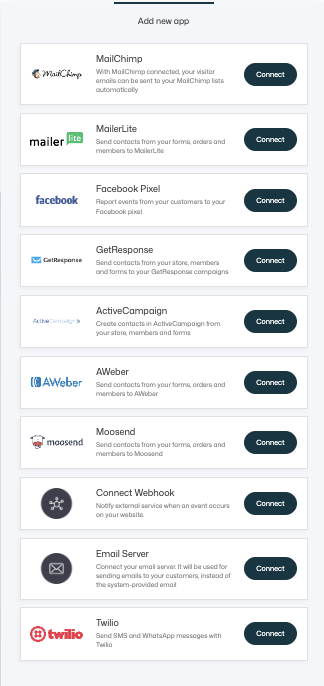
- Enter the required credentials (usually an API key)
- Save the connection
Most providers only require you to paste in an API key generated inside your email marketing account. Once added, the integration will connect automatically.
💡 Note
Each provider has slightly different connection requirements, but the setup is typically very quick and straightforward.
Adding People to Your Email Lists
Once an email provider is connected, you can start adding contacts to your email lists directly from different parts of your project.
Common entry points include:
- Forms
- Quizzes & Surveys
- Bookings
- Checkouts
When editing a form, checkout, or similar component, you’ll see a new option at the bottom allowing you to select:
- The connected email provider
- The specific list or audience to add the contact to
For example, if MailerLite is connected, anyone who submits the form will automatically be added to the selected MailerLite list.

This allows you to:
- Build your email list automatically
- Segment users based on where they signed up, and for what
- Trigger email automations inside your email platform
Typical Use Cases
Email integrations are commonly used to:
- Add leads from forms to email lists
- Subscribe customers after a purchase
- Segment users by funnel or offer
- Trigger onboarding or nurture sequences
- Sync contacts to your existing email workflows
Summary
Email integrations in Recrevio allow you to connect your preferred email marketing platform and automatically sync contacts from forms, checkouts, and other user interactions.
In this article, you learned how to:
- Connect an email provider
- Add subscribers to email lists
- Use integrations across forms and checkouts
Once connected, your email platform becomes a natural extension of your Recrevio project—keeping your marketing flows automated and up to date.