
How to Connect Custom Email Provider via External SMTP
Recrevio allows you to connect a custom email provider via SMTP, giving you full control over how system emails and transactional messages are sent from your project.
This setup is ideal if you already use a dedicated email service or server for transactional email, or if you have specific technical, compliance, or deliverability requirements that require sending email outside of Recrevio’s native email infrastructure.
💡 Not sure which email setup to choose?
If you’re unsure what SMTP is, or simply want the easiest and most flexible setup, we recommend using Recrevio’s native email sending.
This is the option most customers choose and it supports campaigns, automations, analytics, and sales tracking out of the box.
👉 Read this guide: How to Connect Your Domain for Email Sending
In this article, you’ll learn:
- What a custom email (SMTP) connection is
- When and why to use this method
- How it differs from domain-based email sending in Recrevio
- How to connect a custom email provider
- Which use cases this setup is best suited for
What Is a Custom Email (SMTP) Connection?
A custom email connection lets you send emails from Recrevio using your own external SMTP server instead of Recrevio’s built-in email delivery system.
SMTP (Simple Mail Transfer Protocol) is the standard protocol used to send email. By connecting an SMTP provider, you decide:
- Which server sends your emails
- How authentication is handled
- How deliverability, logging, and compliance are managed
This method is commonly used with:
- Dedicated transactional email services
- Custom mail servers
- Enterprise or compliance-driven email setups
When Should You Use Custom Email (SMTP)?
Connecting email via SMTP is recommended if you:
- Already use a transactional email provider you want to keep
- Need advanced deliverability control or custom routing
- Have strict compliance or data-handling requirements
- Want system emails to be sent from a specific infrastructure
- Manage email centrally across multiple platforms
How This Differs from Domain-Based Email Sending
Recrevio supports two different ways of sending email, each designed for different needs.
Custom Email (SMTP)
- Uses an external email provider or server
- Requires SMTP credentials (host, port, username, password)
- Best for transactional and system emails
- Full technical control
- Email delivery happens outside Recrevio
Domain-Based Email Sending (Native)
- Uses Recrevio’s built-in email infrastructure
- Requires domain verification (DNS setup) or verification by email
- Supports campaigns, automations, and analytics
- Best for marketing and communication flows
- Email delivery is managed inside Recrevio
💡 Which should you choose?
Use Custom Email (SMTP) if you need technical control or already have a transactional email setup.
Use Domain-Based Email Sending if you want an all-in-one solution for campaigns, automations, and analytics inside Recrevio.
How to Connect a Custom Email Provider
To connect a custom email provider via SMTP:
- Navigate to the Web Studio
-
Click the Website Settings icon (cog)

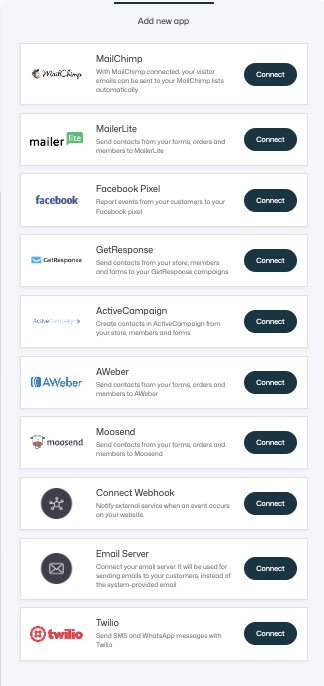
- Go to Applications and click Add application
-
Select Email Server and click Connect
-
Enter your SMTP details:
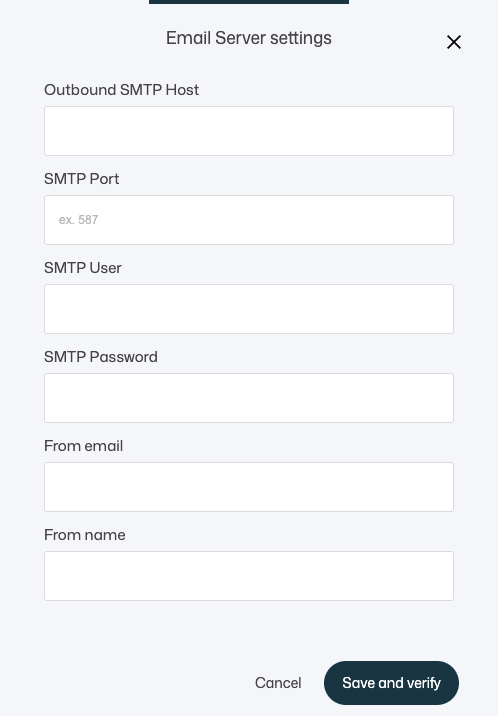
- Outbound SMTP host
- SMTP Port
- SMTP User
- SMTP Password
- From Email
- From Name
- Encryption method (SSL/TLS if required)
- Click Save and verify
Once connected, Recrevio will use this provider to send emails instead of using the built-in email service.
Important Considerations
- SMTP connections are technical by nature and should be configured carefully
- Incorrect credentials can prevent emails from being delivered
- Deliverability depends entirely on your chosen provider
- Analytics and tracking are usually handled outside Recrevio
🔔 Prefer Native Email Sending Instead?
If you want to send email campaigns, automation emails, and tracked messages directly from Recrevio – including open rates, clicks, and sales tracking – domain-based email sending is the recommended approach.
👉 Read this guide: How to Connect Your Domain for Email Sending
This method is ideal if you want:
- Built-in deliverability handling
- Campaign & automation support
- Sales tracking and analytics
- A simpler, all-in-one setup
Summary
Custom Email (SMTP) connections give you full control over how transactional and system emails are sent from Recrevio.
Use this method if you:
- Already rely on an external email provider
- Need advanced technical or compliance control
- Want to centralize email delivery outside Recrevio
If your goal is marketing, automation, and analytics, domain-based built-in email sending is usually the better choice.
Both options are supported — choose the one that fits your workflow best 🚀