
Shippo Integration in Recrevio
Connect Shippo to your store to simplify shipping, compare delivery rates, and manage fulfillment with access to multiple carriers.
Once connected, Shippo can provide available delivery options and shipping rates directly in your checkout, while orders can continue into your Shippo fulfillment workflow without manual exports or copying order details.
This article explains how to create your Shippo API token, connect Shippo to Recrevio, and what happens after the integration is active.
Before you start
To connect Shippo, you need:
- An active Shippo account
- Access to the API section in Shippo
- Permission to create an API token
- Access to Sales Settings in Recrevio
You will first create the API token in Shippo and then add it to your Recrevio shipping settings.
💡 Tip
Keep your API token private. Treat it like a password and only add it to services you trust.
Create your Shippo API token
Start by signing in to your Shippo account.
Open the API section
In your Shippo dashboard, open the API tab.
From there, create a new token.

Copy your API key
Once the token has been created, Shippo will display the corresponding API key.
Copy this key. You will use it to connect Shippo to Recrevio.

💡 Tip
Copy the API key before leaving this page and keep it somewhere secure while you complete the setup.
Connect Shippo to Recrevio
Return to your Recrevio dashboard.
Open the shipping integrations
Go to: Sales & Analytics > Sales Settings > Shipping > Add integration
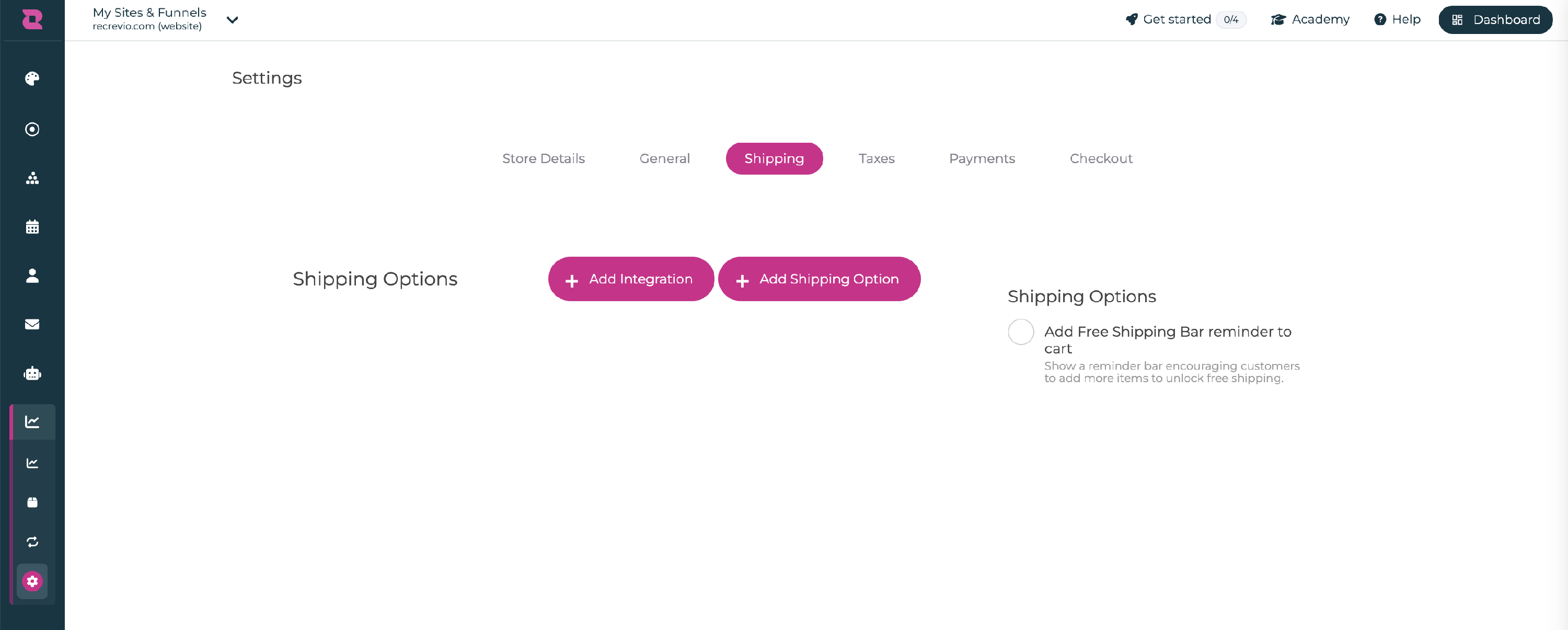
Select Shippo
Choose Shippo from the available shipping integrations.
Add your Shippo API key
Paste the API key you created in Shippo into the corresponding field.
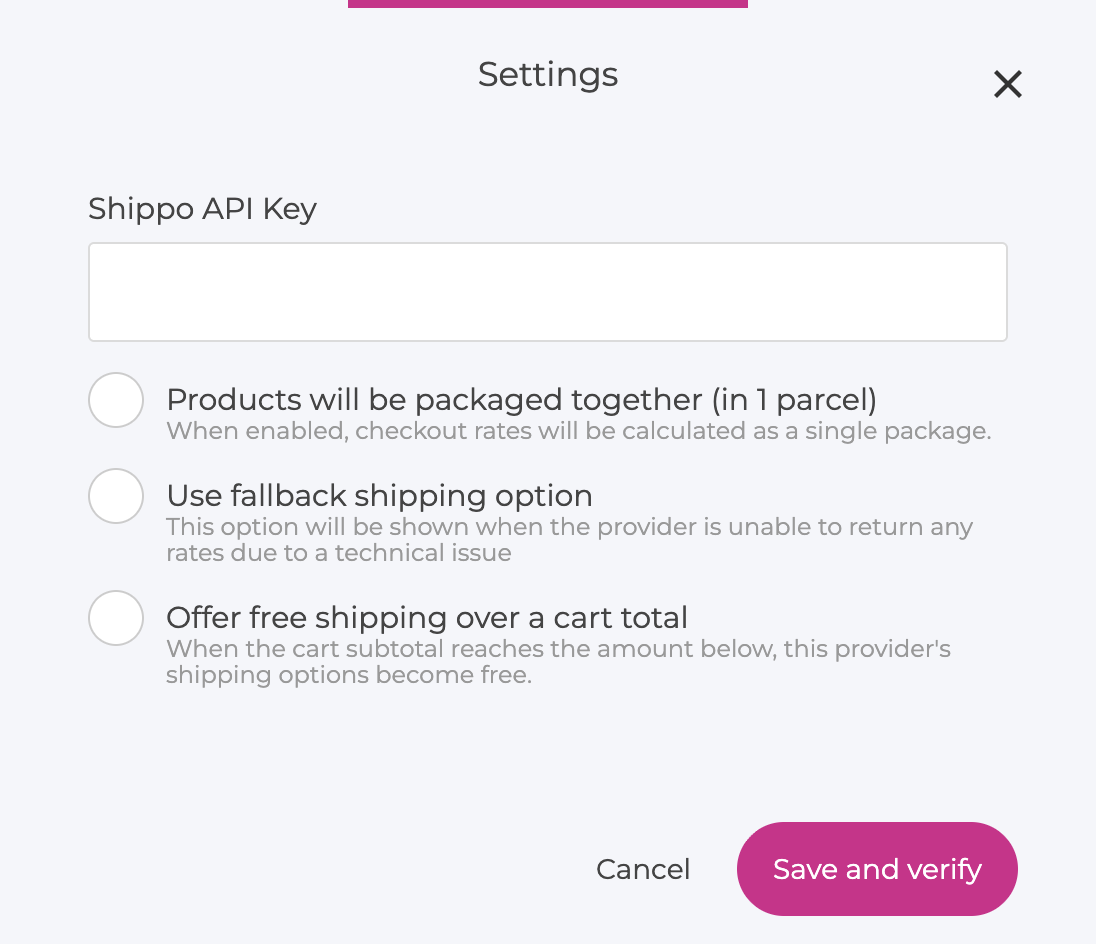
Once the API key has been added successfully, Shippo is connected to your store.
Shipping options at checkout
After Shippo is connected, available Shippo delivery options can automatically appear during checkout.
Customers can then choose from the available shipping methods, and the corresponding shipping cost is added to the order summary.
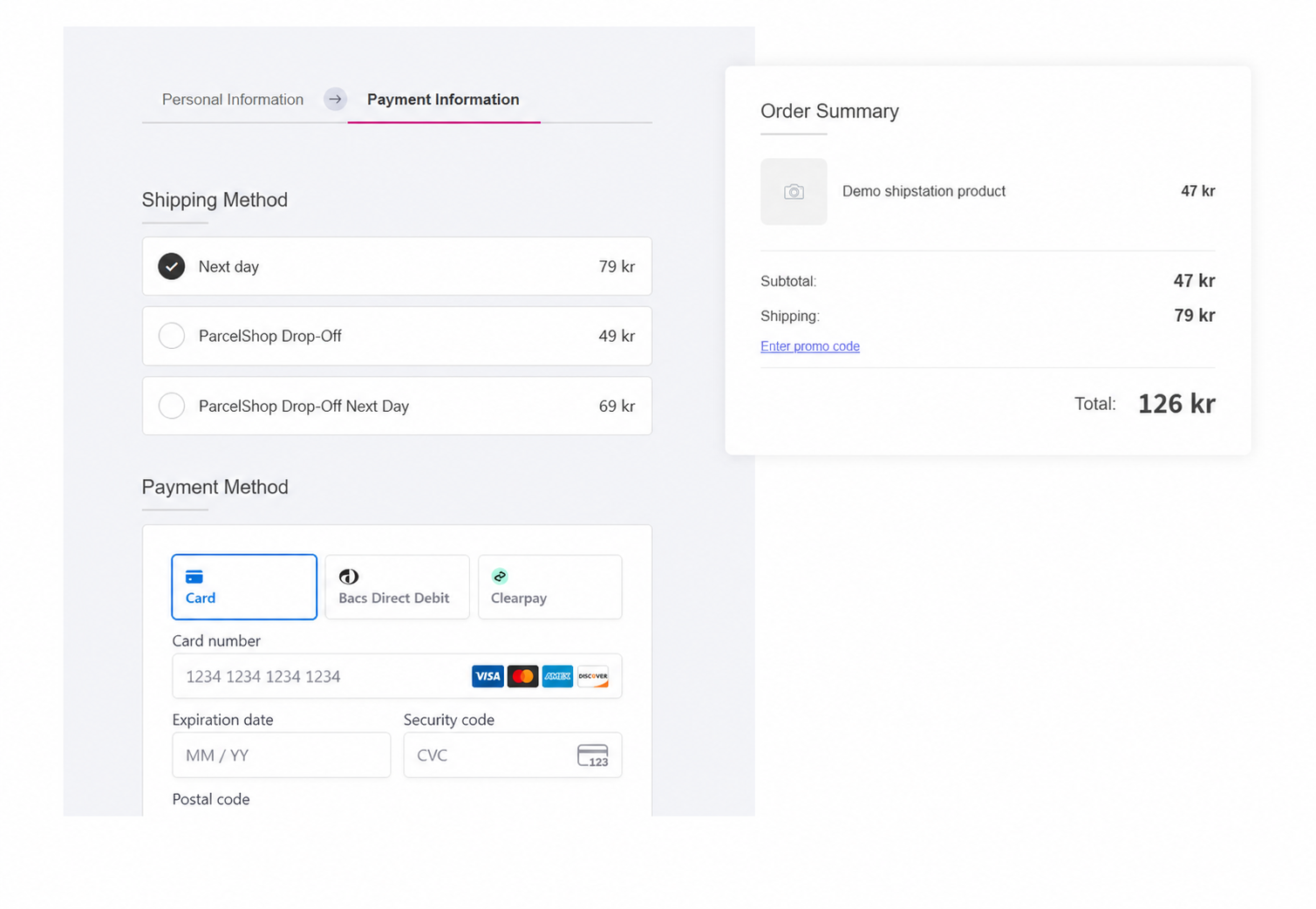
This means customers can see the available delivery options and cost before completing their purchase.
💡 Tip
Place a test order before launching to make sure the expected shipping methods and prices appear correctly in checkout.
What happens after an order is placed
Once an order using Shippo shipping has been processed, the fulfillment information can continue into your Shippo workflow.
From Shippo, you can then work with the available shipping tools to:
- Compare carrier rates
- Select a delivery service
- Create shipping labels
- Manage fulfillment
- Prepare the order for shipment
This removes the need to manually recreate shipping information for each order.
Using multiple carriers
One of the main benefits of Shippo is the ability to work with multiple carriers from the same shipping setup.
Depending on your Shippo configuration and available services, you can compare delivery options and choose the most suitable service based on factors such as:
- Shipping price
- Delivery speed
- Carrier
- Destination
The available services shown to customers depend on the shipping options configured through your Shippo account.
If Shippo stops working
If the integration previously worked but shipping rates stop appearing, check the connection and your Shippo configuration first.
Make sure that:
- Your Shippo account is active
- The API key entered in Recrevio is correct
- The API token is still valid
- The required carriers and shipping services are active in Shippo
- Your products contain the information required for shipping
- The customer's shipping address is valid
- Rates appear correctly when placing a test order
If you create a new Shippo API token, update the integration in Recrevio with the new key.
Shippo vs other shipping integrations
Shippo is primarily a shipping and carrier tool for businesses that continue to store, pick, and pack their own products but want access to carrier rates, delivery options, and shipping labels.
Other integrations solve different needs. ShipStation provides a more dedicated shipping-management workflow, while ShipBob handles outsourced warehousing and fulfillment, and Printful produces and fulfills print-on-demand products.
If you're unsure which integration fits your business, see ShipStation vs Shippo vs ShipBob vs Printful – which should I use?
Summary
- Shippo connects your Recrevio store with multiple shipping carriers and fulfillment tools
- Create an API token from the API section in Shippo
- Copy the generated API key
- In Recrevio, go to Sales & Analytics > Sales Settings > Shipping > Add integration
- Select Shippo
- Paste your Shippo API key to connect the accounts
- Available shipping methods and costs can appear automatically at checkout
- Customers can choose a delivery option before completing the purchase
- Orders can continue into your Shippo shipping and fulfillment workflow
- Use a test order to verify that shipping rates are displayed correctly
Used correctly, the Shippo integration provides a flexible way to offer carrier-based shipping rates at checkout while keeping fulfillment and label creation in one shipping workflow.